分布式环境中的一些基础组件
Mr.Lee 2025-05-14 22:29:23 KubernetesRedisMinioMySQL
书接上回, 上次咱们将 own-open-apis 项目, 部署到了 Kubernetes 集群环境中. worker-* 节点也可以正常拉取镜像了...多实例带来了很多问题....比如, 之前key: value存储在内存中, 现在多实例情况下, 就会各存各的, 就要引入公共存储. 如: Redis, Minio, MySQL 等....这次我们就尝试在Kubernetes 环境中, 安装这些基础组件
闲言少叙, 开始正文
# PostgreSQL
# 1. 下载chart包
❯ helm pull oci://registry-1.docker.io/bitnamicharts/postgresql --version 16.7.27
Pulled: registry-1.docker.io/bitnamicharts/postgresql:16.7.27
Digest: sha256:4ed63727a46ff6e6e1cc48b87c75c4b2abe9e5901d38079ba22768895c00de7a
1
2
3
2
3
# 2. 自定义 values
❯ cat infra/values/postgres.yaml
# Copyright VMware, Inc.
# SPDX-License-Identifier: APACHE-2.0

## @section Global parameters
## Please, note that this will override the parameters, including dependencies, configured to use the global value
##
global:

  postgresql:
    ## @param global.postgresql.auth.postgresPassword Password for the "postgres" admin user (overrides `auth.postgresPassword`)
    ## @param global.postgresql.auth.username Name for a custom user to create (overrides `auth.username`)
    ## @param global.postgresql.auth.password Password for the custom user to create (overrides `auth.password`)
    ## @param global.postgresql.auth.database Name for a custom database to create (overrides `auth.database`)
    ## @param global.postgresql.auth.existingSecret Name of existing secret to use for PostgreSQL credentials (overrides `auth.existingSecret`).
    ## @param global.postgresql.auth.secretKeys.adminPasswordKey Name of key in existing secret to use for PostgreSQL credentials (overrides `auth.secretKeys.adminPasswordKey`). Only used when `global.postgresql.auth.existingSecret` is set.
    ## @param global.postgresql.auth.secretKeys.userPasswordKey Name of key in existing secret to use for PostgreSQL credentials (overrides `auth.secretKeys.userPasswordKey`). Only used when `global.postgresql.auth.existingSecret` is set.
    ## @param global.postgresql.auth.secretKeys.replicationPasswordKey Name of key in existing secret to use for PostgreSQL credentials (overrides `auth.secretKeys.replicationPasswordKey`). Only used when `global.postgresql.auth.existingSecret` is set.
    ##
    auth:
      postgresPassword: "A123456a"
      username: ""
      password: ""
      database: "postgres"
      existingSecret: ""

## Bitnami PostgreSQL image version
## ref: https://hub.docker.com/r/bitnami/postgresql/tags/
## @param image.registry [default: REGISTRY_NAME] PostgreSQL image registry
## @param image.repository [default: REPOSITORY_NAME/postgresql] PostgreSQL image repository
## @skip image.tag PostgreSQL image tag (immutable tags are recommended)
## @param image.digest PostgreSQL image digest in the way sha256:aa.... Please note this parameter, if set, will override the tag
## @param image.pullPolicy PostgreSQL image pull policy
## @param image.pullSecrets Specify image pull secrets
## @param image.debug Specify if debug values should be set
##
image:
  registry: docker.io
  repository: bitnami/postgresql
  # tag: 16.1.0-debian-11-r22
  tag: 14.13.0-debian-12-r16
  digest: ""
  ## Specify a imagePullPolicy
  ## Defaults to 'Always' if image tag is 'latest', else set to 'IfNotPresent'
  ## ref: https://kubernetes.io/docs/concepts/containers/images/#pre-pulled-images
  ##
  pullPolicy: IfNotPresent
  ## Optionally specify an array of imagePullSecrets.
  ## Secrets must be manually created in the namespace.
  ## ref: https://kubernetes.io/docs/tasks/configure-pod-container/pull-image-private-registry/
  ## Example:
  ## pullSecrets:
  ##   - myRegistryKeySecretName
  ##
  pullSecrets: []
  ## Set to true if you would like to see extra information on logs
  ##
  debug: false

## @param architecture PostgreSQL architecture (`standalone` or `replication`)
##
architecture: standalone
## Replication configuration
## Ignored if `architecture` is `standalone`
##
replication:
  ## @param replication.synchronousCommit Set synchronous commit mode. Allowed values: `on`, `remote_apply`, `remote_write`, `local` and `off`
  ## @param replication.numSynchronousReplicas Number of replicas that will have synchronous replication. Note: Cannot be greater than `readReplicas.replicaCount`.
  ## ref: https://www.postgresql.org/docs/current/runtime-config-wal.html#GUC-SYNCHRONOUS-COMMIT
  ##
  synchronousCommit: "off"
  numSynchronousReplicas: 0
  ## @param replication.applicationName Cluster application name. Useful for advanced replication settings
  ##
  applicationName: my_application
## @param containerPorts.postgresql PostgreSQL container port
##
containerPorts:
  postgresql: 5432
## Audit settings
## https://github.com/bitnami/containers/tree/main/bitnami/postgresql#auditing
## @param audit.logHostname Log client hostnames
## @param audit.logConnections Add client log-in operations to the log file
## @param audit.logDisconnections Add client log-outs operations to the log file
## @param audit.pgAuditLog Add operations to log using the pgAudit extension
## @param audit.pgAuditLogCatalog Log catalog using pgAudit
## @param audit.clientMinMessages Message log level to share with the user
## @param audit.logLinePrefix Template for log line prefix (default if not set)
## @param audit.logTimezone Timezone for the log timestamps
##
audit:
  logHostname: false
  logConnections: false
  logDisconnections: false
  pgAuditLog: ""
  pgAuditLogCatalog: "off"
  clientMinMessages: error
  logLinePrefix: ""
  logTimezone: ""
## @param postgresqlDataDir PostgreSQL data dir folder
##
postgresqlDataDir: /bitnami/postgresql/data

## @section PostgreSQL Primary parameters
##
primary:
  ## @param primary.name Name of the primary database (eg primary, master, leader, ...)
  ##
  name: primary
  ## PostgreSQL Primary resource requests and limits
  ## ref: https://kubernetes.io/docs/concepts/configuration/manage-compute-resources-container/
  ## @param primary.resources.limits The resources limits for the PostgreSQL Primary containers
  ## @param primary.resources.requests.memory The requested memory for the PostgreSQL Primary containers
  ## @param primary.resources.requests.cpu The requested cpu for the PostgreSQL Primary containers
  ##
  resources:
    limits: {}
    requests:
      memory: 256Mi
      cpu: 250m
  service:
    ## @param primary.service.type Kubernetes Service type
    ##
    type: ClusterIP
    ## @param primary.service.ports.postgresql PostgreSQL service port
    ##
    ports:
      postgresql: 5432
    ## Node ports to expose
    ## NOTE: choose port between <30000-32767>
    ## @param primary.service.nodePorts.postgresql Node port for PostgreSQL
    ## ref: https://kubernetes.io/docs/concepts/services-networking/service/#type-nodeport
    ##
    nodePorts:
      postgresql: ""
    ## @param primary.service.clusterIP Static clusterIP or None for headless services
    ## e.g:
    ## clusterIP: None
    ##
    clusterIP: ""
    ## @param primary.service.annotations Annotations for PostgreSQL primary service
    ##
    annotations: {}
    ## @param primary.service.loadBalancerIP Load balancer IP if service type is `LoadBalancer`
    ## Set the LoadBalancer service type to internal only
    ## ref: https://kubernetes.io/docs/concepts/services-networking/service/#internal-load-balancer
    ##
    loadBalancerIP: ""
    ## @param primary.service.externalTrafficPolicy Enable client source IP preservation
    ## ref https://kubernetes.io/docs/tasks/access-application-cluster/create-external-load-balancer/#preserving-the-client-source-ip
    ##
    externalTrafficPolicy: Cluster
    ## @param primary.service.loadBalancerSourceRanges Addresses that are allowed when service is LoadBalancer
    ## https://kubernetes.io/docs/tasks/access-application-cluster/configure-cloud-provider-firewall/#restrict-access-for-loadbalancer-service
    ##
    ## loadBalancerSourceRanges:
    ## - 10.10.10.0/24
    ##
    loadBalancerSourceRanges: []
    ## @param primary.service.extraPorts Extra ports to expose in the PostgreSQL primary service
    ##
    extraPorts: []
    ## @param primary.service.sessionAffinity Session Affinity for Kubernetes service, can be "None" or "ClientIP"
    ## If "ClientIP", consecutive client requests will be directed to the same Pod
    ## ref: https://kubernetes.io/docs/concepts/services-networking/service/#virtual-ips-and-service-proxies
    ##
    sessionAffinity: None

  ## PostgreSQL Primary persistence configuration
  ##
  persistence:
    ## @param primary.persistence.enabled Enable PostgreSQL Primary data persistence using PVC
    ##
    enabled: true
    ## @param primary.persistence.existingClaim Name of an existing PVC to use
    ##
    existingClaim: ""
    ## @param primary.persistence.mountPath The path the volume will be mounted at
    ## Note: useful when using custom PostgreSQL images
    ##
    mountPath: /bitnami/postgresql
    ## @param primary.persistence.subPath The subdirectory of the volume to mount to
    ## Useful in dev environments and one PV for multiple services
    ##
    subPath: ""
    ## @param primary.persistence.storageClass PVC Storage Class for PostgreSQL Primary data volume
    ## If defined, storageClassName: <storageClass>
    ## If set to "-", storageClassName: "", which disables dynamic provisioning
    ## If undefined (the default) or set to null, no storageClassName spec is
    ##   set, choosing the default provisioner.  (gp2 on AWS, standard on
    ##   GKE, AWS & OpenStack)
    ##
    storageClass: ""
    ## @param primary.persistence.accessModes PVC Access Mode for PostgreSQL volume
    ##
    accessModes:
      - ReadWriteOnce
    ## @param primary.persistence.size PVC Storage Request for PostgreSQL volume
    ##
    size: 32Gi
    ## @param primary.persistence.annotations Annotations for the PVC
    ##
    annotations: {}
    ## @param primary.persistence.labels Labels for the PVC
    ##
    labels: {}
    ## @param primary.persistence.selector Selector to match an existing Persistent Volume (this value is evaluated as a template)
    ## selector:
    ##   matchLabels:
    ##     app: my-app
    ##
    selector: {}
    ## @param primary.persistence.dataSource Custom PVC data source
    ##
    dataSource: {}
1
2
3
4
5
6
7
8
9
10
11
12
13
14
15
16
17
18
19
20
21
22
23
24
25
26
27
28
29
30
31
32
33
34
35
36
37
38
39
40
41
42
43
44
45
46
47
48
49
50
51
52
53
54
55
56
57
58
59
60
61
62
63
64
65
66
67
68
69
70
71
72
73
74
75
76
77
78
79
80
81
82
83
84
85
86
87
88
89
90
91
92
93
94
95
96
97
98
99
100
101
102
103
104
105
106
107
108
109
110
111
112
113
114
115
116
117
118
119
120
121
122
123
124
125
126
127
128
129
130
131
132
133
134
135
136
137
138
139
140
141
142
143
144
145
146
147
148
149
150
151
152
153
154
155
156
157
158
159
160
161
162
163
164
165
166
167
168
169
170
171
172
173
174
175
176
177
178
179
180
181
182
183
184
185
186
187
188
189
190
191
192
193
194
195
196
197
198
199
200
201
202
203
204
205
206
207
208
209
210
211
212
213
214
215
216
2
3
4
5
6
7
8
9
10
11
12
13
14
15
16
17
18
19
20
21
22
23
24
25
26
27
28
29
30
31
32
33
34
35
36
37
38
39
40
41
42
43
44
45
46
47
48
49
50
51
52
53
54
55
56
57
58
59
60
61
62
63
64
65
66
67
68
69
70
71
72
73
74
75
76
77
78
79
80
81
82
83
84
85
86
87
88
89
90
91
92
93
94
95
96
97
98
99
100
101
102
103
104
105
106
107
108
109
110
111
112
113
114
115
116
117
118
119
120
121
122
123
124
125
126
127
128
129
130
131
132
133
134
135
136
137
138
139
140
141
142
143
144
145
146
147
148
149
150
151
152
153
154
155
156
157
158
159
160
161
162
163
164
165
166
167
168
169
170
171
172
173
174
175
176
177
178
179
180
181
182
183
184
185
186
187
188
189
190
191
192
193
194
195
196
197
198
199
200
201
202
203
204
205
206
207
208
209
210
211
212
213
214
215
216
安装
❯ helm upgrade --install postgresql infra/postgresql-16.7.27.tgz \
    --create-namespace --namespace infra \
    --values infra/values/postgres.yaml
Release "postgresql" has been upgraded. Happy Helming!
NAME: postgresql
LAST DEPLOYED: Mon Oct  6 13:30:21 2025
NAMESPACE: infra
STATUS: deployed
REVISION: 2
TEST SUITE: None
NOTES:
CHART NAME: postgresql
CHART VERSION: 16.7.27
APP VERSION: 17.6.0

⚠ WARNING: Since August 28th, 2025, only a limited subset of images/charts are available for free.
    Subscribe to Bitnami Secure Images to receive continued support and security updates.
    More info at https://bitnami.com and https://github.com/bitnami/containers/issues/83267

** Please be patient while the chart is being deployed **

PostgreSQL can be accessed via port 5432 on the following DNS names from within your cluster:

    postgresql.infra.svc.cluster.local - Read/Write connection

To get the password for "postgres" run:

    export POSTGRES_PASSWORD=$(kubectl get secret --namespace infra postgresql -o jsonpath="{.data.postgres-password}" | base64 -d)

To connect to your database run the following command:

    kubectl run postgresql-client --rm --tty -i --restart='Never' --namespace infra --image docker.io/bitnami/postgresql:14.13.0-debian-12-r16 --env="PGPASSWORD=$POSTGRES_PASSWORD" \
      --command -- psql --host postgresql -U postgres -d postgres -p 5432

    > NOTE: If you access the container using bash, make sure that you execute "/opt/bitnami/scripts/postgresql/entrypoint.sh /bin/bash" in order to avoid the error "psql: local user with ID 1001} does not exist"

To connect to your database from outside the cluster execute the following commands:

    kubectl port-forward --namespace infra svc/postgresql 5432:5432 &
    PGPASSWORD="$POSTGRES_PASSWORD" psql --host 127.0.0.1 -U postgres -d postgres -p 5432

WARNING: The configured password will be ignored on new installation in case when previous PostgreSQL release was deleted through the helm command. In that case, old PVC will have an old password, and setting it through helm won't take effect. Deleting persistent volumes (PVs) will solve the issue.

WARNING: There are "resources" sections in the chart not set. Using "resourcesPreset" is not recommended for production. For production installations, please set the following values according to your workload needs:
  - readReplicas.resources
+info https://kubernetes.io/docs/concepts/configuration/manage-resources-containers/

⚠ SECURITY WARNING: Original containers have been substituted. This Helm chart was designed, tested, and validated on multiple platforms using a specific set of Bitnami and Tanzu Application Catalog containers. Substituting other containers is likely to cause degraded security and performance, broken chart features, and missing environment variables.

Substituted images detected:
  - docker.io/bitnami/postgresql:14.13.0-debian-12-r16

⚠ WARNING: Original containers have been retagged. Please note this Helm chart was tested, and validated on multiple platforms using a specific set of Bitnami and Bitnami Secure Images containers. Substituting original image tags could cause unexpected behavior.

Retagged images:
  - docker.io/bitnami/postgresql:14.13.0-debian-12-r16
1
2
3
4
5
6
7
8
9
10
11
12
13
14
15
16
17
18
19
20
21
22
23
24
25
26
27
28
29
30
31
32
33
34
35
36
37
38
39
40
41
42
43
44
45
46
47
48
49
50
51
52
53
54
55
56
2
3
4
5
6
7
8
9
10
11
12
13
14
15
16
17
18
19
20
21
22
23
24
25
26
27
28
29
30
31
32
33
34
35
36
37
38
39
40
41
42
43
44
45
46
47
48
49
50
51
52
53
54
55
56
# MySQL
# 1. 下载chart包
❯ helm pull oci://registry-1.docker.io/bitnamicharts/mysql --version 14.0.3
Pulled: registry-1.docker.io/bitnamicharts/mysql:14.0.3
Digest: sha256:2bbaf66e43dad7edce1eb563e19bcabd83eb8c8f79549505ad1c48e3a0cbfbba

# 2. 定义values
1
2
3
4
5
6
7
8
9
10
2
3
4
5
6
7
8
9
10
# 下载chart包
❯ cd ~/development/workspace/docker/helm
❯ helm pull oci://registry-1.docker.io/bitnamicharts/minio --version 16.0.10
Pulled: registry-1.docker.io/bitnamicharts/minio:16.0.10
Digest: sha256:4927f3269ca49c2789bbf0c394eadca3c08ee8ccc114d452c6d59bf4432dc07a
❯ helm pull oci://registry-1.docker.io/bitnamicharts/redis --version 21.1.2
Pulled: registry-1.docker.io/bitnamicharts/redis:21.1.2
Digest: sha256:1286b4590e4a97c91b0d7f584dc01e8f441017ca9cc86576903e7ad26533d62b
1
2
3
4
5
6
7
8
2
3
4
5
6
7
8
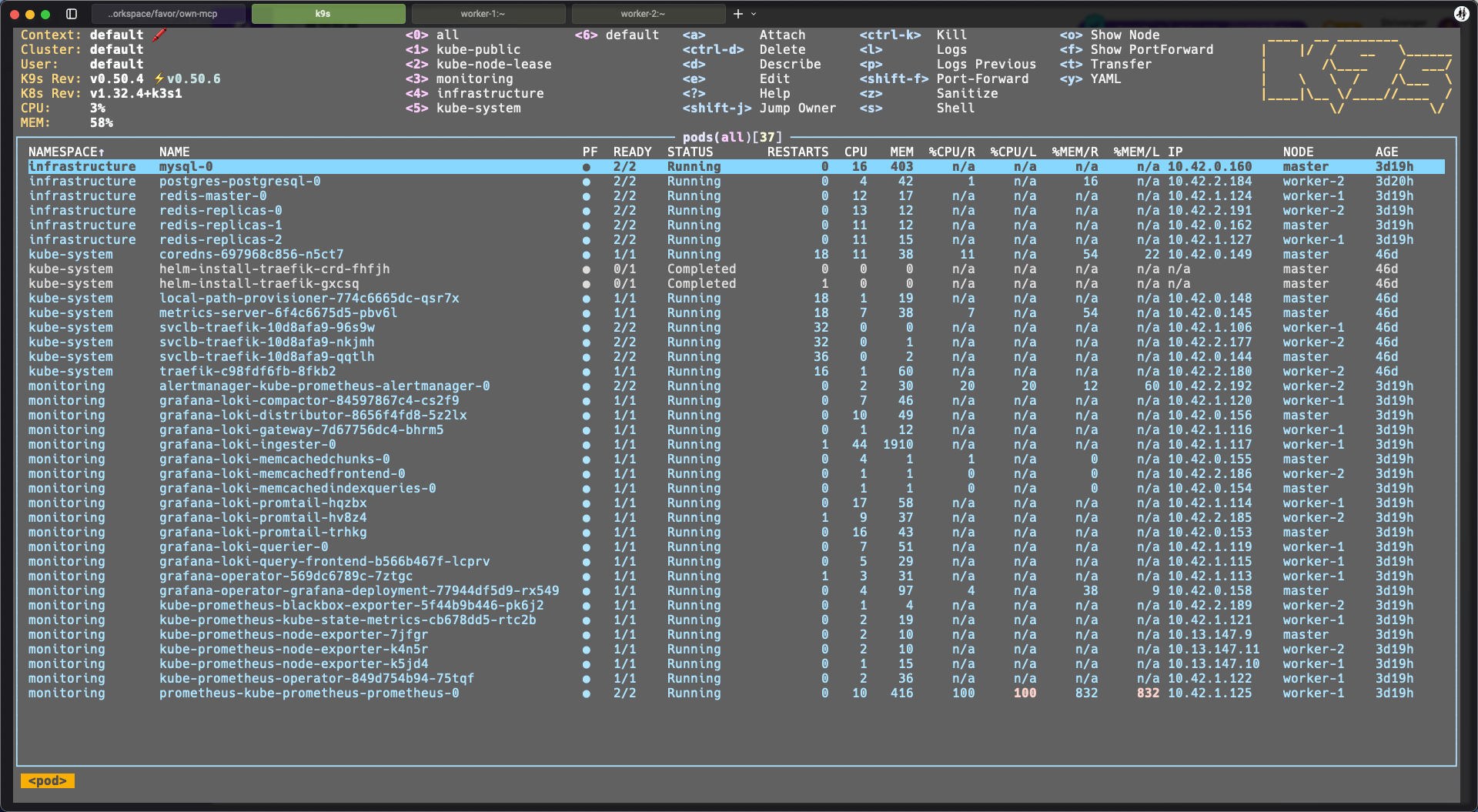
最后的成果